
Mradi360 construction project management
Know your profit on every site, before the project ends.
Mradi360 tracks every material, purchase, expense and invoice against the project it belongs to, so you see what each site has cost and earned at any stage of the build.
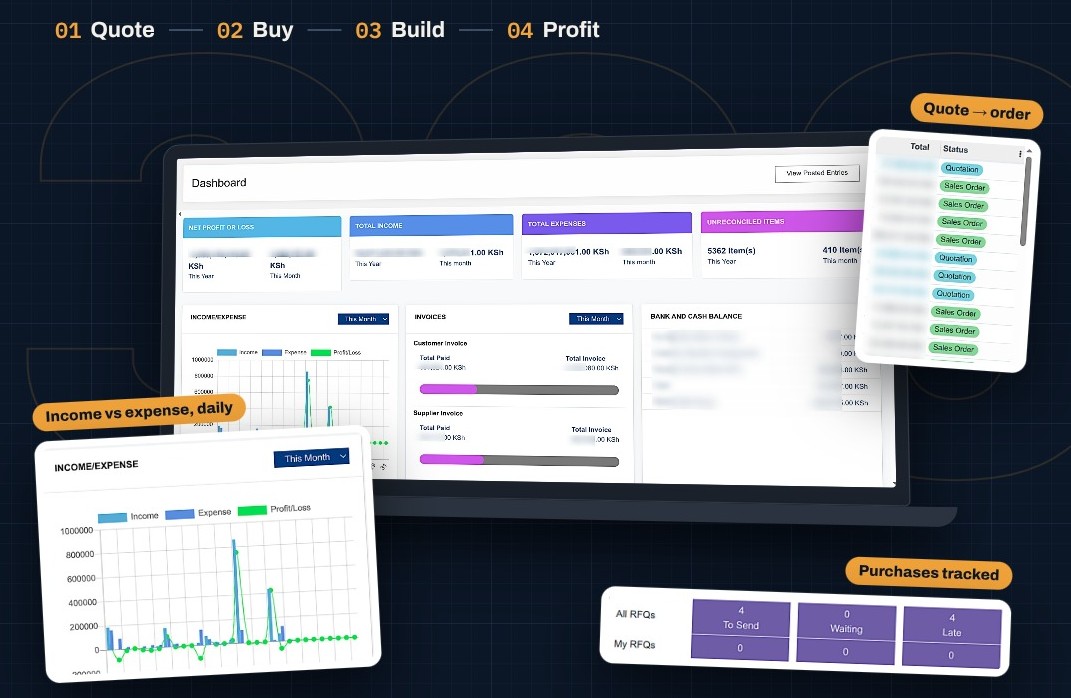
Most contractors only find out if a project made money after it is finished.
Construction projects run for months or years, involve hundreds of purchases and pass through many hands. Without one system holding it together, costs slip through the cracks.
Costs scattered across paper and Excel
Purchases, site expenses and sales live in separate files and notebooks, so nobody sees what a project has really cost.
Materials that disappear between store and site
Cement and steel are bought in bulk with no reliable record of how much went to which site.
No view of work in progress
On a long project you cannot tell whether you are ahead or behind until the end.
Profit or loss discovered too late
By the time the final figures are added up, the overspend has already happened.
Slow quoting and billing
Quotations, BOQs, invoices and reminders are prepared by hand and chased by phone.
Client issues handled informally
Requests and complaints arrive by call or WhatsApp and are easily lost.
The solution
One system for every project, every site and every shilling.
Every material requisition, purchase order, expense, quotation and invoice is linked to the project it serves. From winning the job to the final invoice, Mradi360 handles quotations, requisitions, procurement, site stores, billing, reminders and reports, so you protect your margin while the project is still running.
At any moment you know:
Budget
What the project should cost, from its BOQ.
Actual cost
Materials, labour, services and expenses so far.
Earned
Quotations accepted and invoices sent.
Work in progress
The value of work on site not yet billed.
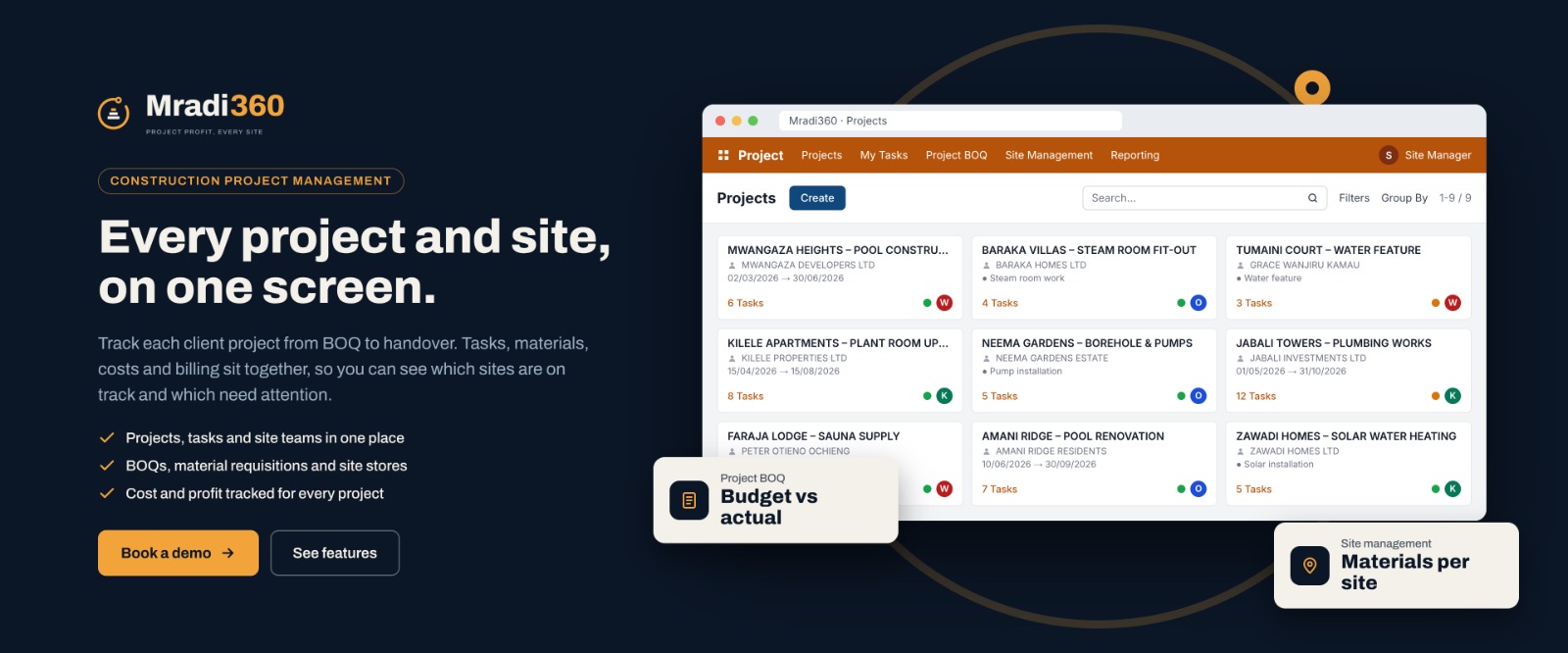
From the first quote to the final invoice.
Mradi360 follows your project through every stage and keeps every cost tied to it.
1
Register the project
Capture the project owner, site location, scope, start date and contract value.
2
Prepare the BOQ and quotation
Build the Bill of Quantities, turn it into a quotation and email it to the project owner.
3
Plan the work
Break the project into phases and tasks, assign them and set deadlines.
4
Request materials
Site teams raise requisitions; approved requests go to procurement or are issued from stock.
5
Buy and receive
Request supplier quotes, raise purchase orders, receive goods to the store or site, and pay suppliers.
6
Record every cost on site
Materials, labour, equipment, transport and expenses are recorded against the project and its tasks.
7
Bill the client
Invoice completed stages with automatic SMS reminders. Clients pay through M-PESA or Equity.
8
Watch the margin
The dashboard compares budget, actual cost, work in progress and billing for every project.
9
Close and review
At handover you have a complete record of cost, revenue and final profit.
Profit and loss on every project, not just at year end.
Most accounting systems tell you how the company did. Mradi360 tells you how each project is doing while it is still running.
| What Mradi360 tracks | Where it comes from | What it tells you |
|---|---|---|
| Budget | The project BOQ and quotation | What the job should cost and earn |
| Materials cost | Requisitions, purchases and stock issued to site | How much material has gone into the project |
| Labour, services and expenses | Expenses recorded on the project and its tasks | The other costs of delivering the work |
| Work in progress | Costs on work not yet billed | Value on site that has not been invoiced |
| Revenue | Invoices sent to the project owner | What the project has earned so far |
| Payments received | M-PESA, Equity and other payments | How much cash has actually come in |
| Profit or loss | Revenue minus actual cost | Whether the project is making money today |
Spot an overrun on one site in week six, not after the handover.
Seven modules, all linked to your projects.
Start with project management and costing, and switch on more as your business grows.
- Project onboarding with owner, site, scope, contract value and key dates
- Bill of Quantities used as the budget for actual costs
- Phases and tasks assigned to engineers, foremen and subcontractors
- Expenses recorded on the task they belong to
- Material requisitions from site teams
- Quotations to project owners
- Several sites at once, each with its own materials, tasks and costs
- Log every request, complaint or variation until it is resolved
- Reach clients by email and SMS, with optional WhatsApp
- Send updates on progress, site visits, delays and milestones
- Keep the full history of every client conversation
- Professional quotations, including from the BOQ
- Convert accepted quotations into sales orders
- Manage delivery of materials and goods to clients
- Follow up open quotations so no job slips away
- Bill project expenses and completed stages
- Monitor budget, actual cost, work in progress and revenue per project
- Accept payments through M-PESA and Equitel
- Send bills and payment reminders by SMS
- Customer statements and standard financial reports
- Request quotations from several suppliers and compare prices
- Raise purchase orders linked to a project
- Receive goods to the main store or straight to site
- Record supplier bills and pay suppliers
- Track cement, steel, timber, tiles, fittings and other materials
- Manage tools, generators and equipment across stores and sites
- Record transfers from the main store to each site
- See stock levels at a glance and reorder in time
- Progress and status of every project
- Budget against actual cost, with projects at risk of overrun
- Site activity, material usage and open requisitions
- Unpaid client invoices and pending supplier bills
Built for the people who build.
Building and civil works contractors
Run several sites at once and know the cost and margin of each.
Real estate developers
Track spending on every block, phase and unit, from foundation to handover.
Project managers and quantity surveyors
Compare BOQs against actual costs and keep projects on budget.
Specialist and finishing contractors
Electrical, plumbing, roofing and fit-out firms that quote, buy and bill per job.
Owners and directors
See the health of every project without waiting for month-end reports.
Why construction businesses choose Mradi360.
- Know your profit while it still matters: cost, revenue and margin during the build.
- Stop losing materials: every bag of cement traced from purchase to store to site.
- Control costs against the BOQ: catch overspending before it eats your margin.
- Value your work in progress for better decisions and reporting.
- Get paid faster with on-time invoices, SMS reminders and M-PESA or Equity payments.
- Buy smarter by comparing supplier quotes and linking each purchase to a project.
- One source of truth shared by the office and the site.
- Happier clients who are kept informed and heard.
Connected to the way you already work.
| Integration | What it does for you |
|---|---|
| M-PESA | Clients pay invoices from their phones; payments are recorded against the right invoice and project. |
| Equity Bank and Equitel | Payments are received and confirmed through your bank. |
| SMS | Invoices, payment reminders and project updates go to clients automatically. |
| Quotations, BOQs, invoices and statements go to clients and suppliers. | |
| WhatsApp (optional) | Project owners raise issues and receive updates on WhatsApp. |
Questions contractors ask us.
Something else on your mind? Message us on WhatsApp or call +254 762 820 447.
Every purchase, material issue, expense and invoice is linked to a project. Mradi360 adds up the actual costs and compares them with the BOQ budget and the revenue billed, so you can see each project’s margin at any time.
It is the value of work already done and paid for in materials and labour but not yet invoiced. Tracking it shows the true position of a long project instead of waiting for the final bill.
Yes. Each site has its own tasks, materials, costs and progress, and the dashboard shows them all together.
Yes. You build the Bill of Quantities for each project, use it to prepare the quotation, and Mradi360 measures actual costs against it as the work goes on.
They raise a material requisition against the project. Once approved, materials are issued from stock or bought through procurement, and the cost goes to that project.
Yes. Transfers from the main store to each site, and the materials used there, are recorded so you always know where your stock went.
Through M-PESA or Equity (Equitel). Payments are recorded against the right invoice, and SMS reminders go out for unpaid bills.
No. Start with what you need most, such as projects and costing, and add sales, procurement, stock or CRM later.
Mradi360 is built by Amkatek on Odoo, a proven business management platform used by companies worldwide.
Pricing depends on the size of your business and the modules you need. Contact us for a quote and a free demo.
See Mradi360 on one of your own projects.
Book a free demo and we will show you how Mradi360 tracks materials, costs and billing on every site, so you know your profit before the project ends.

Amkatek builds ERP systems, mobile apps and payment integrations that help businesses in Kenya and Rwanda run with less paperwork and more control.
Systems
Integrations
Contact
+254 762 820 447
info@amkatek.com
Thika: Equity Plaza Building, 5th Floor
Nairobi: Suite 37B, Kahyawe Road, off Galana Road, Kilimani
© 2026 Amkatek Limited. All rights reserved.